
Smart Operations
INTAG | Indoor positioning using existing site signals
Where existing signals and compatible devices meet the site’s requirements, INTAG can support asset tracking and dispatch without adding dedicated positioning equipment. Verify coverage and positioning performance along the routes your team uses.
Discuss an on-site pilot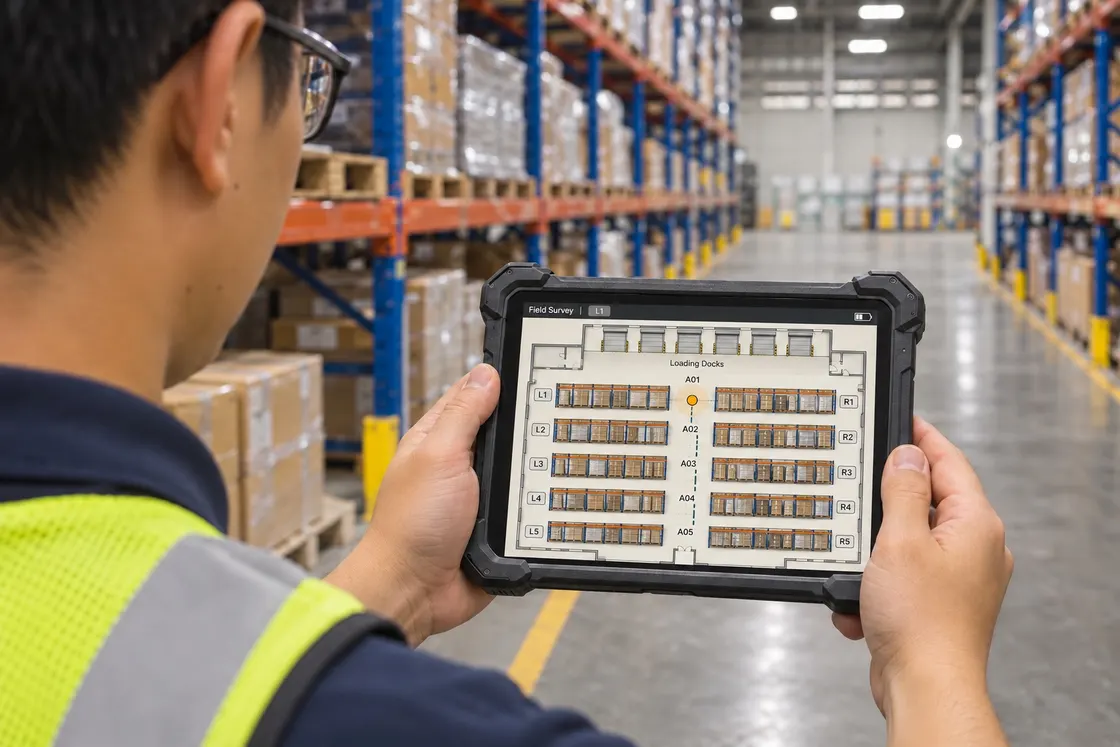
Indoor Positioning Without Additional Dedicated Anchors — Where Conditions Allow
INTAG can leverage existing site conditions to reduce the need for additional dedicated positioning equipment.
Hardware requirements and positioning performance are subject to site assessment and validation.
Comparison baseline
BLE architecture requiring new fixed receivers
Deployment illustration: Square markers show example locations for new fixed receivers.
- Plan receiver locations and mount new equipment
- Arrange power and connectivity as needed
- Maintain the added receivers and connections
Recommended by NNPC
INTAG | Less fixed equipment to install
Deployment illustration: A technician uses a handheld device to survey the operating route.
- Check site conditions and walk the operating route
- Validate positioning on that route
- Recheck coverage when the site changes
- Storage racks
- Aisles
- Loading area
Deployment, maintenance and expansion
| Aspect | BLE Architecture Requiring New Fixed Receivers | INTAG |
|---|---|---|
| Deployment | Plan fixed receiver locations, install the equipment and make the required connections. | Assess the site, walk the operating route and validate positioning. Where conditions allow, no new dedicated positioning equipment is needed. |
| Maintenance | Maintain fixed receivers, power and network connections as required by the design. | Continue to manage the system, end devices and changes to the site environment. |
| Management & Expansion | Assess whether expansion requires moving or adding fixed receivers. | Repeat the walk survey, validate positioning and make any necessary improvements based on site conditions. |
Deployment
BLE: Plan receiver locations, install fixed equipment and connect it.
INTAG: Assess the site, walk the route and validate positioning. Where conditions allow, no new dedicated positioning equipment is needed.
Maintenance
BLE: Maintain fixed receivers, power and connections.
INTAG: Manage the system, end devices and site conditions.
Management & Expansion
BLE: Assess whether to move or add fixed receiver locations.
INTAG: Repeat the walk survey, validate and make improvements as needed.
This comparison applies only to BLE architectures requiring additional fixed receivers. INTAG hardware requirements and positioning performance depend on site conditions and validation.
What it can look like on site
Illustrative scenario and sample data. Views and rules are agreed during the pilot.
Site walk-test illustration. The tablet shows an example interface, not an INTAG product screenshot. The yellow dot marks the survey point.
Applications to evaluate in a pilot
These diagrams illustrate pilot scenarios. Define the modules, rules, user roles and acceptance checks in the project scope.
Dynamic Dispatch
Example: A loading request arrives. The supervisor checks the forklift’s last reported zone and update time, confirms availability with the operator, assigns the move and follows up at the loading point. Agree how the team records assignments and completion during the pilot.
GEO Fencing
Define a zone on the floor plan and test when an entry, exit or dwell event should be recorded. Agree who receives the notification and how to handle uncertain positions near a boundary.
ESG Enhance Analytics
Compare travel routes and dwell by zone or shift to find repeated waiting and unnecessary trips. Energy use or emissions estimates require separate measurements and an agreed calculation method.
Where it fits
Reusable assets are hard to locate
Record agreed handoff or zone events for containers, tools or equipment when staff need to know where to look next.
Movement events cannot be matched to a process
Connect a known asset ID and time to a receiving, staging or dispatch point. Define whether the use case needs a checkpoint event, a zone or a position.
From data to action
Choose objects and event points
List the objects, materials, mounting constraints, movement speeds and critical detection areas. Define which events matter to operations.
Test the selected approach on site
Use the proposed positioning or identification equipment in representative routes and areas. Check metal, obstacles, nearby zones and different orientations where relevant.
Turn events into an action
Associate the event with the asset register. Decide how to handle repeat reads, missing events and the gap between last observed and current position.
What to include in the proposal
Pilot scope and deliverables
Agree a sample asset population, location or checkpoint map, event schema, coverage test and report on detection exceptions.
Integrations priced separately
Confirm the selected hardware, network and power, tag maintenance, WMS or ERP event interfaces and any required location precision. Product specifications depend on the chosen design.
Pilot acceptance and exceptions
Compare against a known movement
Run the agreed routes with a manual reference log. Compare detected and missed events, wrong-zone reads and time stamps by location.
Challenge the edge cases
Test several assets passing together, a missed read and an object held near a boundary. Check how staff correct or annotate events without inventing a position.
Assess the site for a positioning pilot
Share the areas, assets, operating scenarios and wireless network you want to assess. We can check what equipment is needed and how to verify positioning performance on your working routes.